
ELLA changelog
A faster way to add a client, with auto-fill
Onboarding
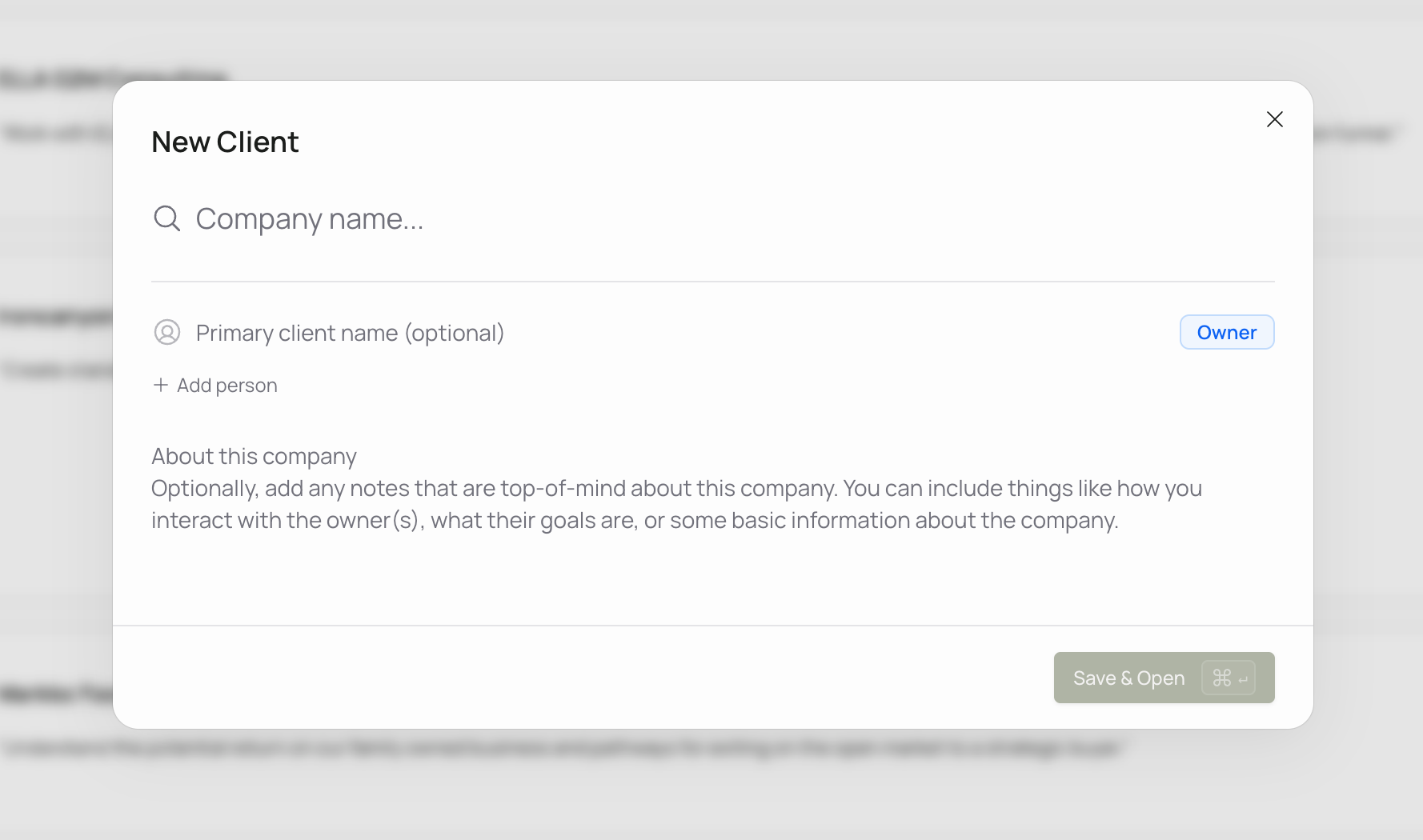
Adding a new client is now faster and far less manual. As soon as you enter a company, ELLA fills in what it can automatically.
Automatic company identity. Enter a business and ELLA pulls in its details, so you're not typing everything by hand.
Logos, handled. Company logos are fetched automatically, so each client workspace looks right from the start.
A head start on Business Identity. Core business identity information is pre-seeded from enrichment data, giving fact finding a running start you can review and refine.
Choose who sees each Sensemaking chat
Sensemaking
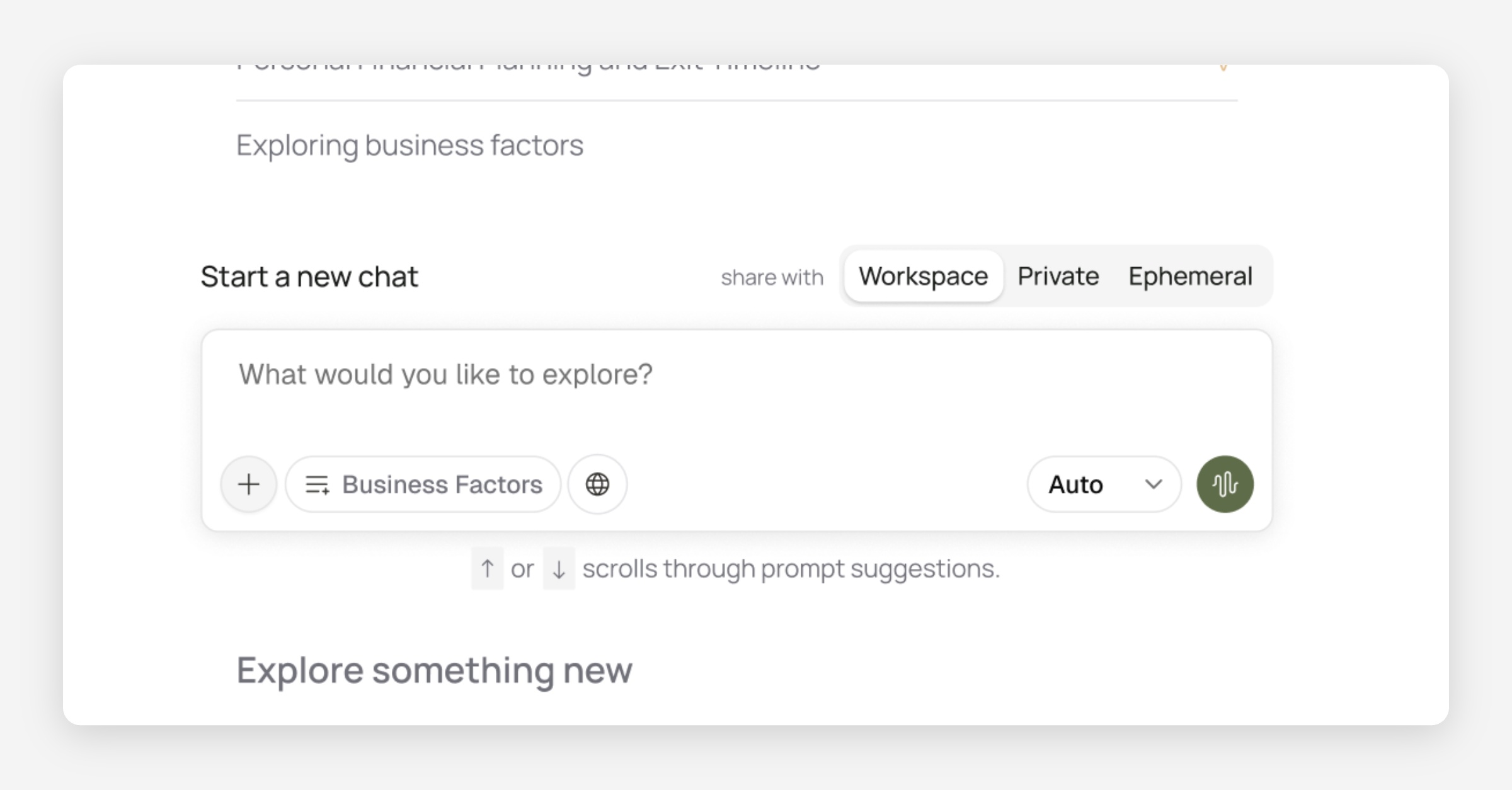
Until now, Sensemaking chats have lived purely at the team level. Now you can choose to keep some chats in your own private workspace.
Before you send, use share with in the composer:
Workspace
Same as before — everyone on the engagement can read the chat. Only the owner can keep writing. Shared chats show a Shared badge in the list.Private (new)
Only you can see the chat. What ELLA learns from it stays with you — not the rest of the workspace.Ephemeral (new)
For questions with highly sensitive information you don’t want stored in chat history. The chat deletes itself one hour after the most recent message.
For compliance purposes, org admins can turn this option off under Settings → Chat → Allow ephemeral chats.
A denser, clearer advisor workspace
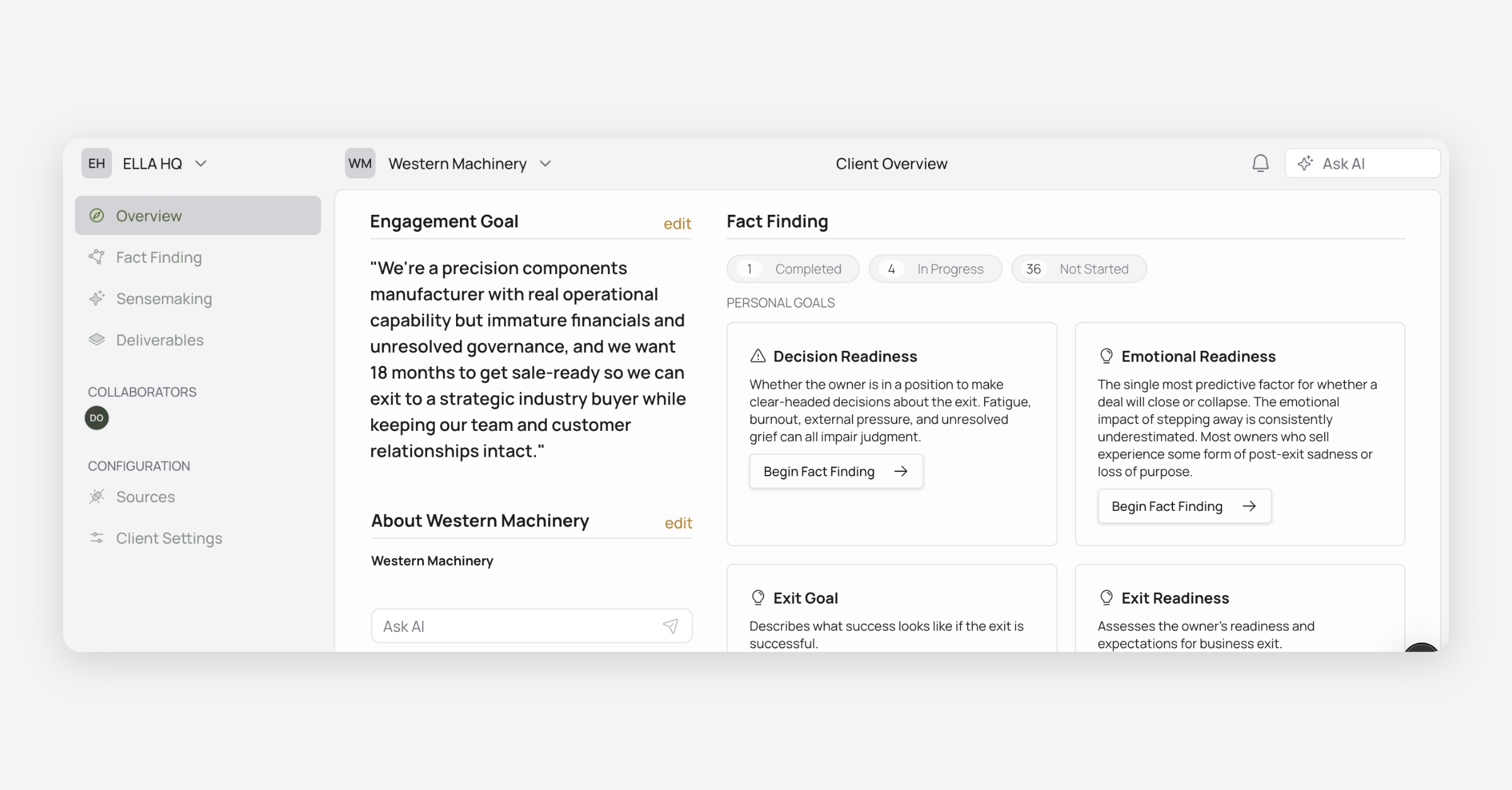
In April, we introduced a new layout. Today, we’re releasing our first major iteration on that layout, tightening the advisor shell so navigation takes less space and controls sit in more ergonomic locations.
What’s new
Framed work area — Page content sits in a clean inset panel under the top bar, so the sidebar and page feel more distinct.
Your firm in the corner — The organization switcher (with org logo) lives in the sidebar header; the ELLA logo took a backseat.
Tighter top bar & sidebar — Shared header height is shorter and section spacing is more consistent.
Ask AI & account in better homes — Ask AI sits next to notifications in the top bar (on client workspaces). Profile, feedback, and related footer actions live at the bottom of the sidebar.
Faster path home — Click the client logo in the top bar to jump to Client Overview; the name/chevron still opens the client list when you have more than one.
Clearer Fact Finding nav — Review Sources, Manage guides, and Uncategorized Factors (when needed) sit up top; Business Identity lives under Business Guides; Add template is removed from the sidebar.
Plus, additional small polish throughout: quieter notification bell, clearer hover/cursor on switchers, and aligned secondary headers with the page chrome.
“Exit Goal” is now “Engagement Goal” (and customizable)
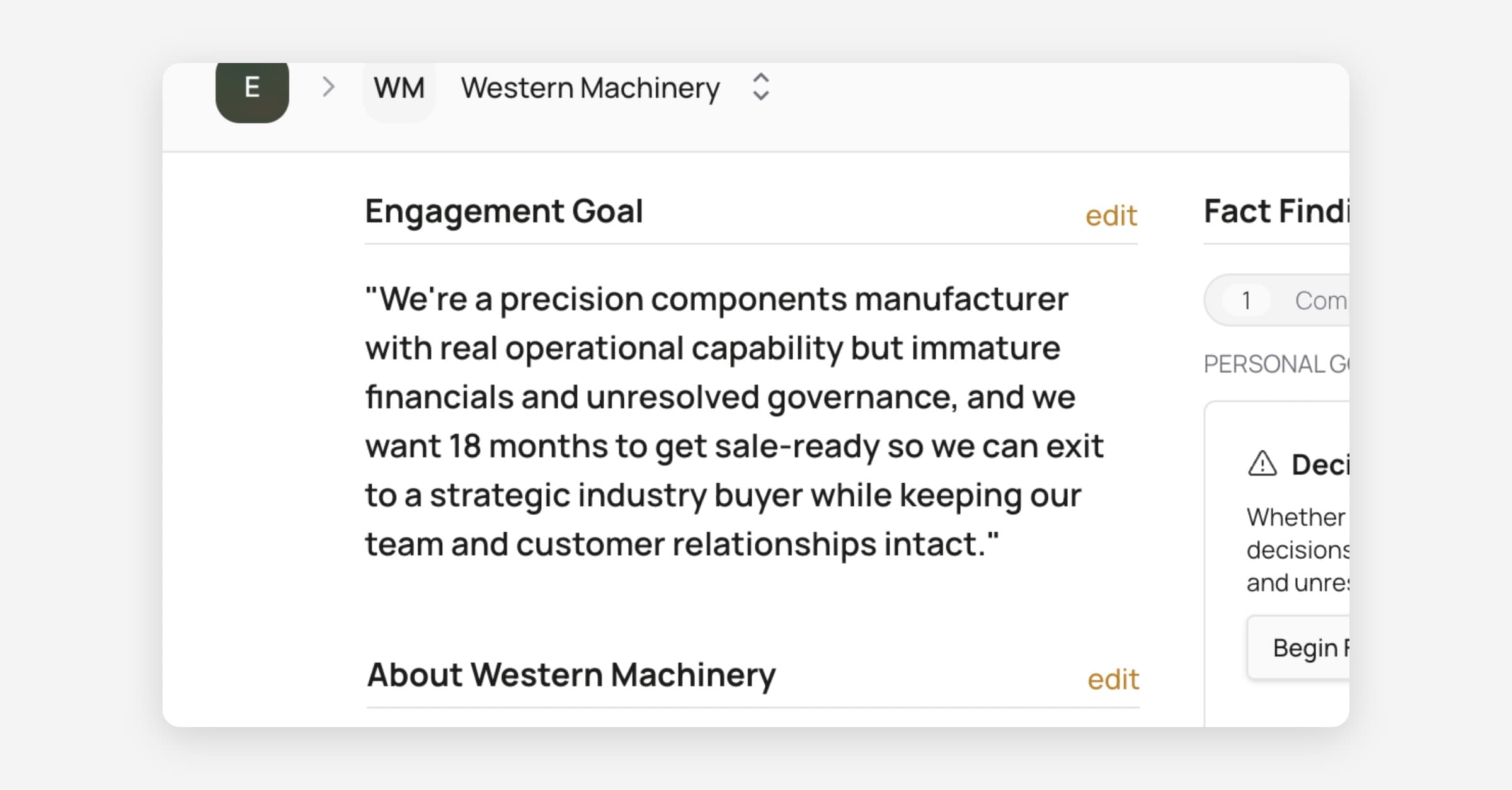
Not every engagement is an exit. You can now customize the goal per-client with the language you think is most correct. We’ve also renamed the default goal title (previously Exit Goal) to Engagement Goal so the label fits the work you’re actually doing, whether that’s succession, readiness, growth planning, or a full exit.
You’ll see the new wording on the dashboard and in settings wherever the goal showed up before. Same field, clearer language.

Sensemaking skills that better reflect your workflows
ELLA’s Sensemaking skills got a broad refresh. Several now work more like a conversation with a colleague than a rigid checklist — especially around revenue model, customer concentration, owner goals, and readiness.
What’s new to try:
Plan information gaps — work through missing business factors with ELLA and leave with a concrete plan: who to ask, which documents to pull, what to cover in the next conversation.
Post-meeting synthesis — drop in a transcript or notes and get context-aware takeaways tied to the business, plus prompts for what to dig into next.
Pre- and post-meeting workflows — clearer paths before a meeting (including when you’re already working with an owner) and after.
Readiness, valuation prep, financial hygiene, and buy-sell review — tightened so they lean on documents and fact-finding already in the workspace, and ask when something’s missing instead of guessing.
Try asking things like: “What’s still missing before we’re ready for valuation?” or “Synthesize my last meeting against this business.”
Mid-July Bugbash
Over the past two weeks, we’ve been at work picking through ELLA with a fine-toothed comb before we get back to new feature development — over 100 individual bugfixes, tweaks, and improvements. Some of these fixes have been rolling out over the last few weeks already, while others were included in a big push today.
Sensemaking Speed and Streaming Resilience
We’ve been focusing heavily on the experience advisors feel when using sensemaking. In particular, we’ve been focusing on:
Speed — research across business factors and documents should hang less and finish sooner.
Reliability — chat send/stop/mic states are more consistent, long replies scroll more cleanly, and interrupted streams are more likely to resume cleanly if your connection hiccups.
If Sensemaking used to feel “stuck” mid-turn or the send button flickered the wrong state, this release targets that. The experience using Sensemaking continues to be a focus, so please share your feedback with how you’re using AI chat.
Sensemaking Quality Review Controls
You can now thumbs-up or thumbs-down Sensemaking replies, and optionally leave a short reason. That feedback helps us improve answer quality without training on your client content.
There’s also a workspace setting to allow manual quality review of anonymized AI responses. When it’s off, vote buttons stay disabled with a clear path to settings. When it’s on, you can rate answers in context — and the quality-review prompt no longer sits as a permanent banner once you’ve already consented.
AI inputs and outputs are never used for model training, with or without this setting.
Additional Improvements and Fixes
General UI
Migrated icons from Lucide to Phosphor across the application for visual consistency
Added truncation for breadcrumbs in the top-nav
Simplified the new client animation and removed an unused "Goal" icon from business factor cards
Fixed positioning of the trial limit banner on the Add Client button
Removed an invalid CSS rule that broke brand color styling
Page subheaders (including Fact Finding) are more consistent
Editing client business info no longer fails when industry is unset.
Client logos: higher size limit, no infinite flash on failed image lookup from our logo provider, actions hidden when there’s no logo to show.
Fact Finding
Added an "Edit" button to the template preview drawer
Added a scope filter for fact-finding templates on the templates library page
Owner-guides sidebar polish: clearer naming, add-owner-guide, better empty states
Improved performance when switching between fact-finding guide screens
Settings
Fixed a spurious "saving" indicator on load for About This Engagement in settings and standardized AI Preferences and AI Memory on the same autosave pattern
Deliverables
Advisor cursors no longer show anonymous animal names during deliverable collaboration
Multiple improvements to Deliverables editing stability
Trust & Reliability
Further hardened document storage access so workspace files are more tightly scoped in how long a download link can be accessed, and by whom
Clearer error handling when something goes wrong server-side (including support-friendly error references)
Support, Docs, & Changelog —Right where you work
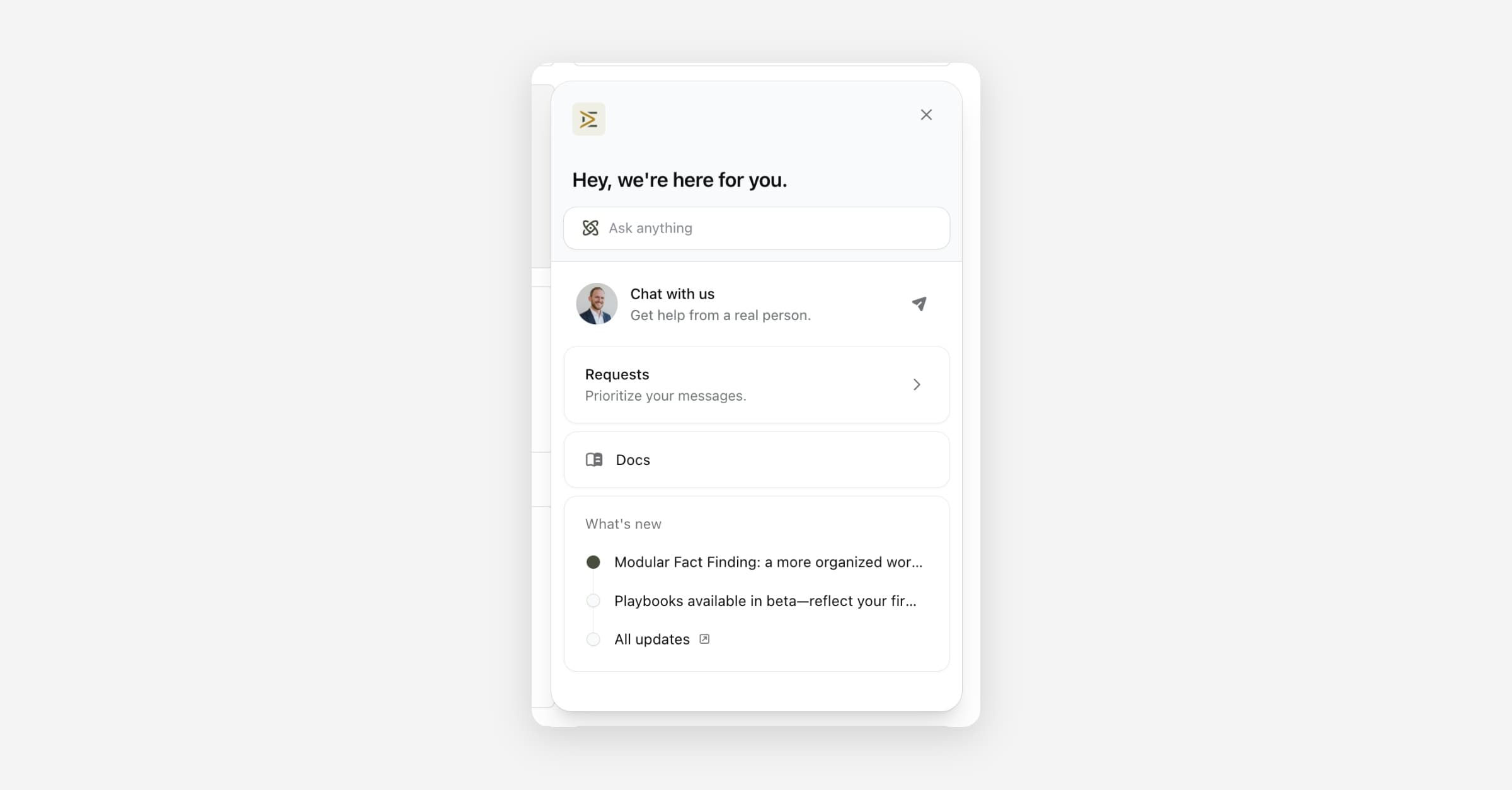
We've brought support into ELLA so you don't have to leave your workspace to get help, find answers, or tell us what you’d like us to build next.
Look for four new links at the bottom of the sidebar:
Chat with us
Message the ELLA team when something's unclear or you need a hand. Conversations stay tied to your account, so we can follow up with context.
Documentation
Browse help articles without opening a new tab or hunting through email threads. Start here when you're looking for how something works.
Give feedback
Share ideas, friction, and requests as you work. Feedback goes straight to the product team and helps shape what we ship next.
Changelog
See what's new in ELLA — features, improvements, and fixes — in one place.
Modular Fact Finding: a more organized workspace
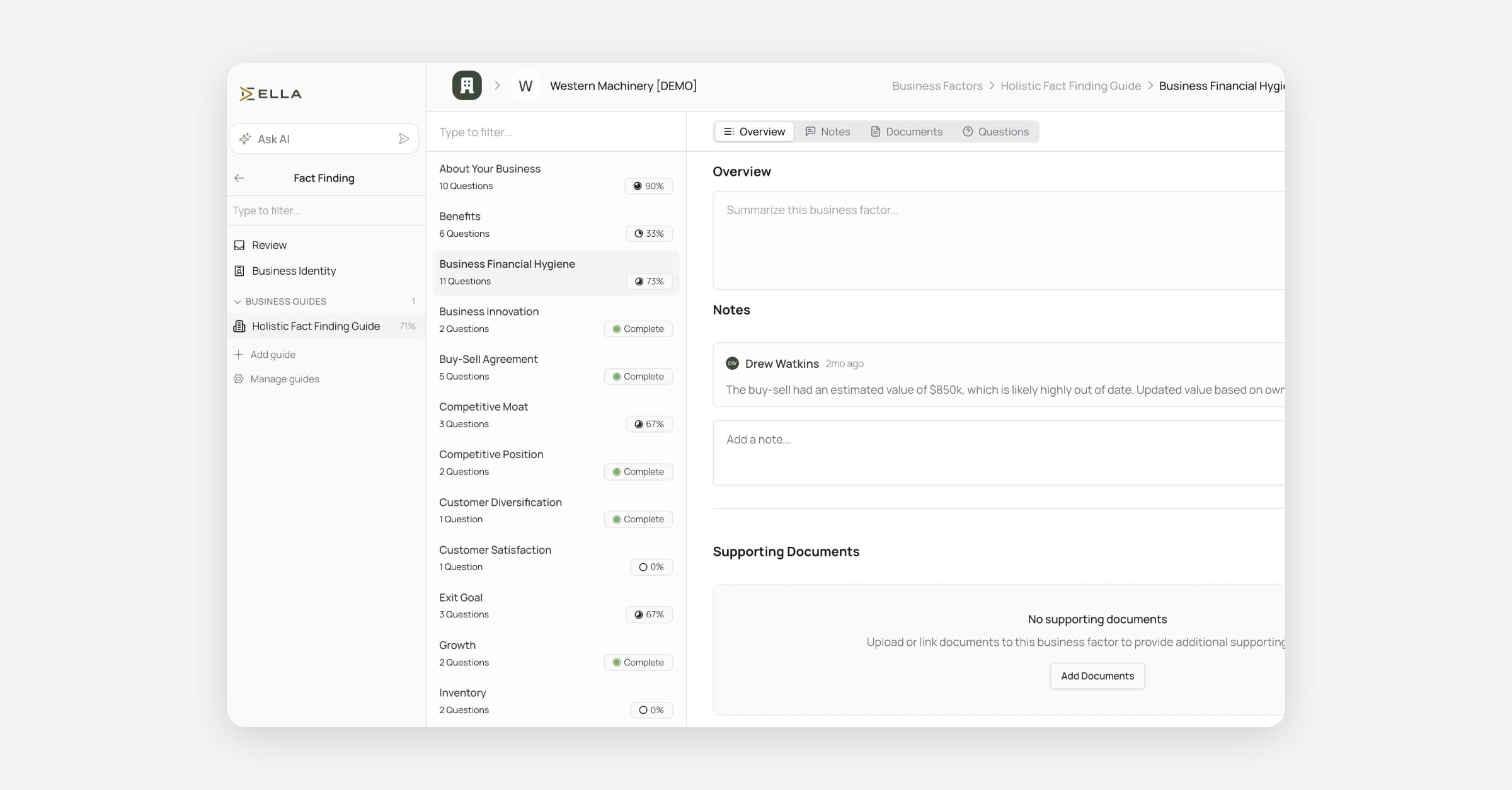
This release lays the foundation for Modular Fact Finding, a clearer way to organize evidence, guides, and review across a client workspace.
We heard from many users that trying to cram all of the questions you may have for a business owner into a single fact‑finding guide created a messy workspace and didn’t reflect an advisor’s process. With this update, you’re now able to create multiple fact‑finding guides within each client’s workspace. You can break them apart based on each owner or different phases of your process.
When you open Fact Finding, you'll now see several options in the far left sidebar:
At the top is Review, where you're able to open up document ingestion and pull facts from each of the documents you've uploaded to this client's workspace.
Below that, you see Business Identity, which is a core group of questions that are relevant for any business you're working with.
Then, you’ll see Business Guides, which is where you can create or use fact finding guides that reflect on each phase of our process or change as the business matures over time, so everything stays organized.
We’ll soon be expanding this to offer Owner Guides, which allows you to create fact-finding guides specific to each owner, reflecting the personal elements of the advisory process that apply to an individual, rather than the firm as a whole.
All Changes
What's new in Fact Finding:
Dedicated fact-finding sidebar — Browse guides, documents, and related sections from a consistent left panel within fact-finding.
Sources page — Documents and evidence now live under a dedicated Sources area, making it easier to see what information ELLA is working from.
Guide management — Add, organize, and manage fact-finding guides directly from the workspace.
Review surfaces — New review flows to work through AI suggestions and factor hints before accepting them.
Business identity — A dedicated area to capture and review owner/business identity information.
Workspace notifications — Notification preferences are now accessible per client workspace.
Collaborator roles — Clearer collaborator types so you can distinguish how different people participate in a workspace.
Auditor access — Advisors can grant time-limited auditor access when external review is needed.
Transcripts & evidence:
Upload meeting transcripts — You can now upload
.vttand.srttranscript files as source documents.Clearer transcript highlighting — When reviewing AI suggestions backed by a transcript, ELLA highlights the specific relevant passage so you can verify evidence faster.